ClearComply is designed for business owners who want to stay on top of their compliance obligations without hiring an accountant or company secretary to do it for them. For R99/month (cancel anytime), you get a full compliance dashboard that checks your CIPC status, tracks every filing deadline across 12+ regulatory bodies, and gives you plain-language instructions to fix any issues yourself.
This guide walks you through every feature in the plan — from running your first CIPC diagnostic to setting up deadline reminders so you never miss a filing again.
1. Sign up and run your first CIPC check
Getting started takes under two minutes. Head to clearcomply.co.za/register, choose your billing interval, and create your account. Your subscription starts immediately.
Once you are in your dashboard, enter your company's CIPC registration number (the number on your CoR14.3 certificate — it looks like 2019/123456/07). Click Run Check, and ClearComply will run a 5-point diagnostic against CIPC's live data. The results come back in seconds.
The five checks cover:
- Beneficial Ownership (BO) status — Whether your company has a current Beneficial Ownership declaration on file with CIPC. Since July 2024, this is a hard requirement before you can file your annual return.
- Annual Return status — Whether your CIPC annual return is up to date. Missing two consecutive annual returns triggers automatic deregistration proceedings.
- Deregistration risk — Whether CIPC has flagged your company for voluntary or involuntary deregistration. If your company has been gazetted for deregistration, you may have limited time to act.
- Business rescue proceedings — Whether your company is currently under business rescue. This affects your ability to transact, take on new contracts, and access certain services.
- Registration status — Whether your company is in good standing, final deregistration, or another status category with CIPC.
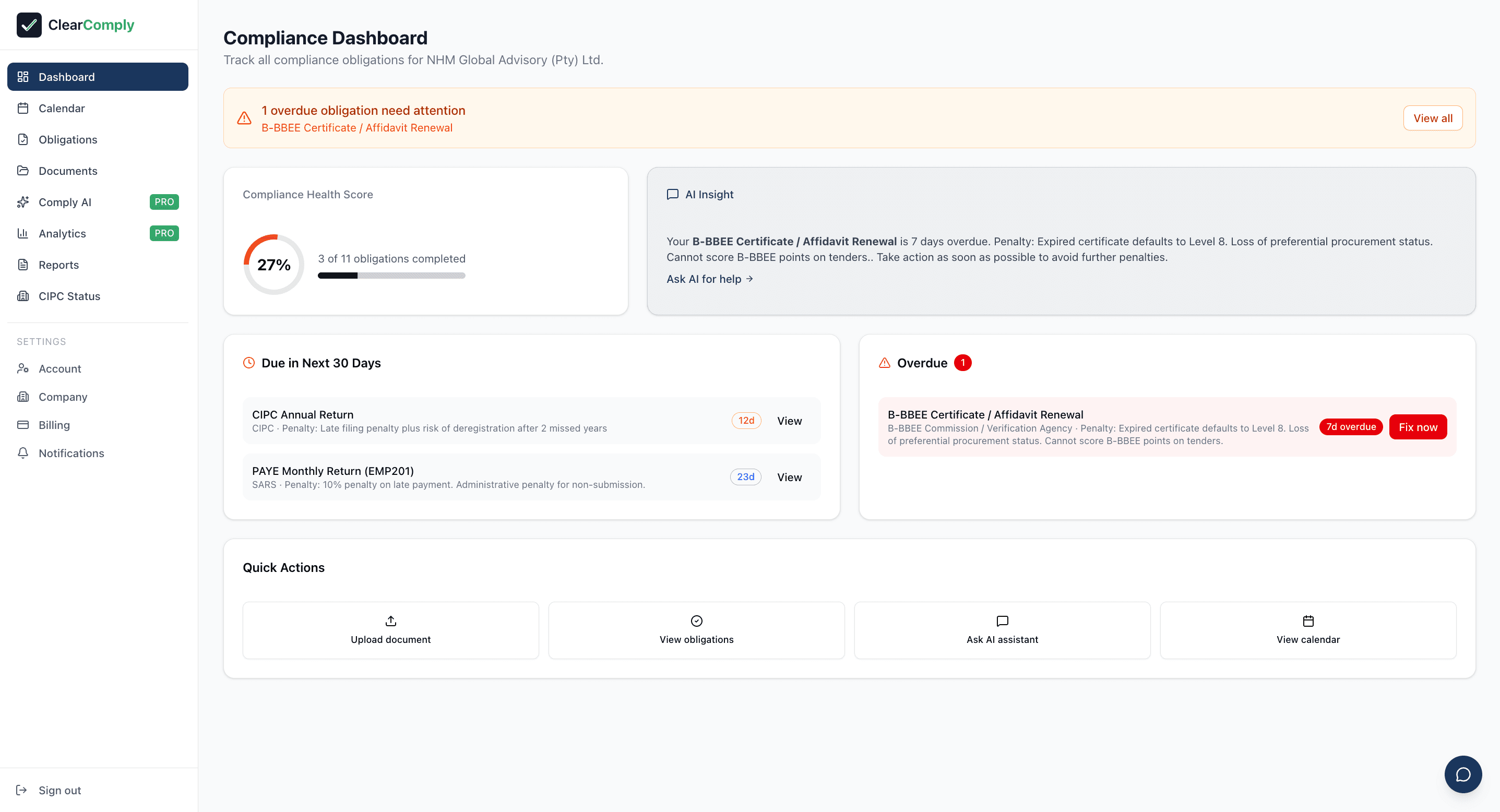
Your compliance dashboard — health score, overdue items, and upcoming deadlines at a glance.
2. Read your diagnostic report
After the check completes, ClearComply presents your results in a clear, colour-coded format. Each of the five checks receives a status:
- RED — Needs attention. There is an issue that requires action. Your annual return may be overdue, your BO declaration may be missing, or your company may be flagged for deregistration. Red items come with a plain-language explanation of what is wrong and what happens if you do not address it.
- AMBER — Watch. Something is not immediately critical but warrants monitoring. For example, your annual return anniversary is approaching, or a filing is due within the next 30 days.
- GREEN — Clear. No issues found. Your company is compliant on this check.
You can download your diagnostic report as a PDF directly from the results screen. This is useful for sharing with business partners, your accountant, or for your own records. The PDF includes the date of the check, each status, and the detailed findings.
3. Use the DIY fix guide
For every RED item in your diagnostic, ClearComply generates a step-by-step fix guide written in plain language — not legal jargon. Each guide tells you:
- What to file — the exact form or declaration needed
- Where to go — direct links to the CIPC eServices portal or the relevant regulatory body's website
- What documents you need — certified ID copies, mandates, securities registers, and any other supporting documents
- How long it takes — realistic time estimates so you can plan
- What it costs — CIPC filing fees and any other costs involved
The fix guide is designed so that any business owner can follow the instructions themselves without needing to hire a professional. Each step is numbered and described in the order you need to complete them.
4. Set up your compliance calendar
The compliance calendar is the core of ClearComply. It tracks all 12+ regulatory obligations that apply to South African companies — not just CIPC. Here is what the calendar covers:
- CIPC Annual Return — Due on your company anniversary date each year
- Beneficial Ownership declaration — Must be filed before your annual return, and updated within 10 business days of any ownership change
- SARS Income Tax — Corporate income tax return filing deadline
- Provisional Tax — Two compulsory payments per year (August and February), with an optional third in September
- VAT — Monthly or bi-monthly returns depending on your VAT registration category
- PAYE — Monthly employer tax submissions if you have employees
- UIF — Monthly Unemployment Insurance Fund contributions
- COIDA — Annual Compensation Fund return of earnings
- Employment Equity reports — Annual reporting if you meet the threshold
- B-BBEE — Annual verification or affidavit renewal
- POPIA — Data protection compliance obligations and renewal of your Information Officer registration
- PAIA — Annual PAIA report submission by 30 June each year
The calendar shows you exactly what is due, when it is due, and your current status for each obligation. Upcoming deadlines are highlighted so you can see at a glance what needs attention this month.
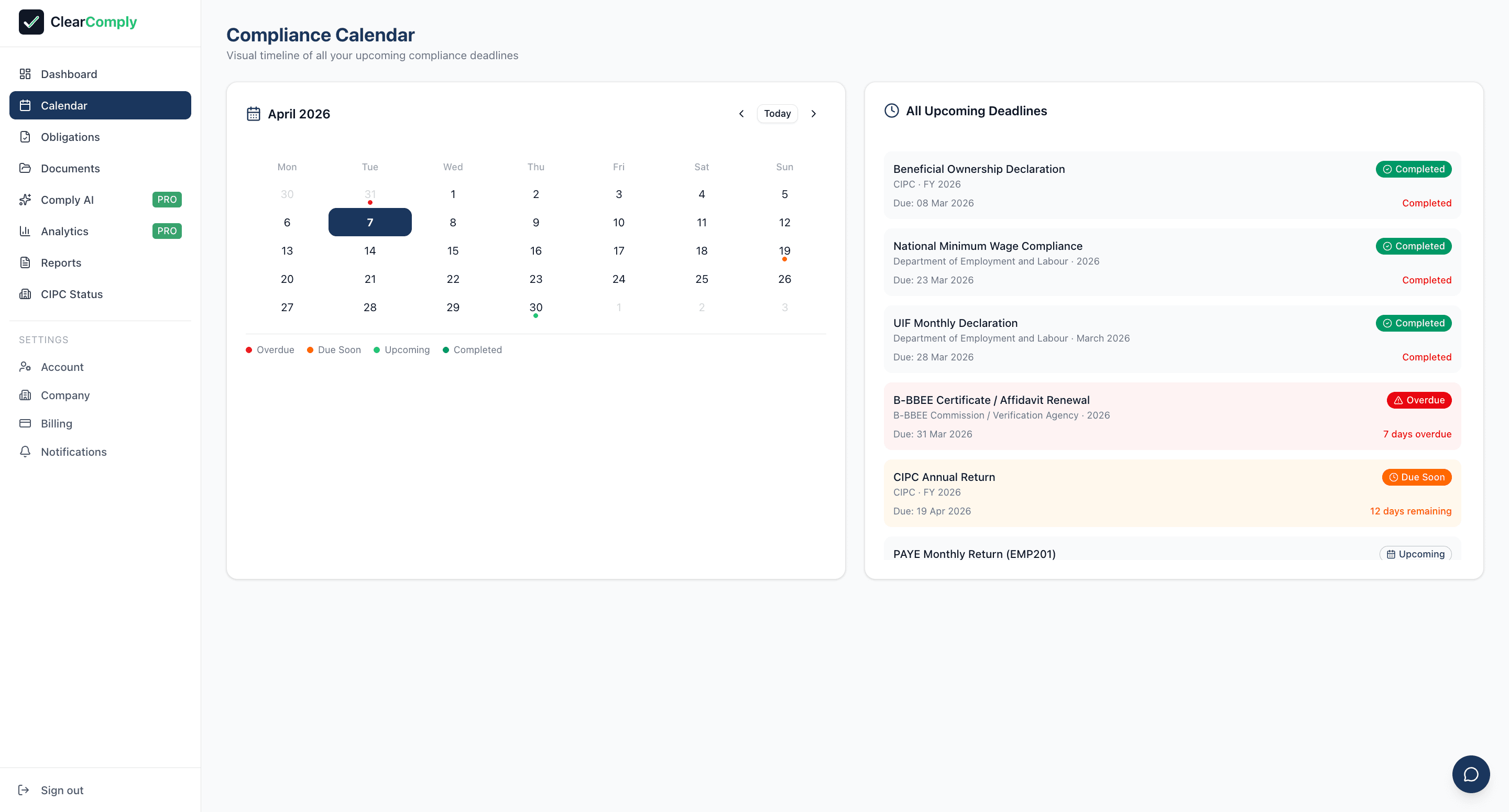
The compliance calendar — every deadline colour-coded by status so nothing slips through.
5. Enable deadline reminders
Missing a filing deadline is the single most common reason South African companies end up non-compliant. ClearComply solves this with automatic email reminders sent at three intervals before each deadline:
- 7 days before — Early warning. Enough time to gather documents and prepare your filing.
- 3 days before — Priority reminder. If you have not started, this is your signal to act now.
- 1 day before — Final reminder. Last chance to file before the deadline passes.
Reminders are enabled by default when you set up your compliance calendar. You can manage your reminder preferences from your dashboard settings — choose which obligations you want to be reminded about, and adjust the email address where reminders are sent.
Each reminder email includes a direct link back to your ClearComply dashboard, along with a summary of what needs to be filed and any documents you will need. No more searching through emails or trying to remember dates.
6. CIPC monitoring
Your initial CIPC check is not a once-off snapshot. With ClearComply, your company is checked daily. This means:
- If CIPC updates your company's status (for example, flagging it for deregistration or recording a compliance notice), ClearComply detects the change and notifies you by email.
- If your annual return status changes — from compliant to overdue, or from overdue to filed — your dashboard updates automatically.
- If your Beneficial Ownership status changes on CIPC's records, you will see the updated status in your dashboard.
You do not need to log in and manually re-run your check. ClearComply watches your company's CIPC record continuously and alerts you when something changes. This is particularly valuable if you have filed a correction — you will know when CIPC has processed it.
7. Document vault
ClearComply includes a 100 MB document vault where you can upload and store your most important compliance documents in one secure place. Instead of digging through email attachments, filing cabinets, or shared drives, everything lives alongside your compliance dashboard.
Documents you should store in the vault:
- CoR14.3 — Your company registration certificate
- Annual return receipts — Proof of filing for each year
- BO filing confirmation — Your Beneficial Ownership confirmation certificate from CIPC
- Tax clearance certificates — Your Tax Compliance Status PIN documentation
- COIDA Letter of Good Standing — Your Compensation Fund letter
- B-BBEE certificate or affidavit — Your latest verification document
- PAIA manual — Your company's PAIA manual as required by the Information Regulator
Documents are organised by type and date, so you can find what you need quickly. When a deadline is approaching and the reminder email tells you what documents are needed for the filing, you can access them directly from your vault.